How SSL inspection affects next-generation firewall throughput
A next-generation firewall may appear comfortably sized when its specification sheet lists several gigabits per second of throughput. Then a pilot enables inspection of encrypted web traffic, latency rises, and the available capacity looks different. The firewall has not necessarily failed; the original number may have described a different workload.
SSL inspection gives Next-Generation Firewalls visibility into encrypted traffic, but decryption, content inspection, and re-encryption consume resources. The effect depends on the traffic mix, TLS settings, security policies, and hardware architecture—not simply the headline performance rating. For technical evaluators, the task is to identify which performance figure resembles production and then test whether it holds under realistic conditions.
What changes when encrypted traffic is inspected?
Without decryption, a firewall can apply controls using information available outside the encrypted payload, such as addresses, ports, and certain connection metadata. The visibility available varies by protocol and implementation. It cannot generally examine the full application content of a TLS-encrypted session while that content remains encrypted.
In a typical outbound TLS inspection deployment, the firewall acts as an intermediary. It establishes a TLS session with the client and another with the destination server, presenting a substitute certificate that the client is configured to trust. Between those sessions, the firewall can apply controls such as intrusion prevention, malware inspection, URL filtering, or data-loss prevention, depending on the product and policy.
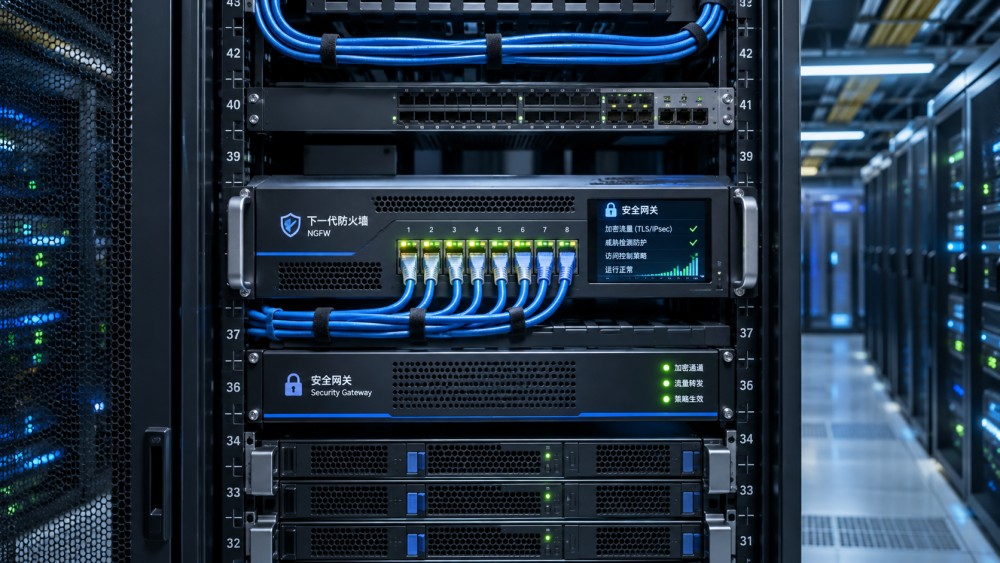
That visibility introduces work at several stages: certificate validation and generation, TLS handshakes, bulk cryptographic operations, application parsing, content scanning, and policy enforcement. Depending on architecture, these functions may run on general-purpose processors, dedicated accelerators, or a combination. They may also contend for memory, session tables, and inspection-engine capacity.
“SSL inspection” remains common industry language, although current deployments generally inspect TLS rather than the obsolete SSL protocols. Inbound inspection can use a different arrangement, such as an approved reverse-proxy design for services the organization controls. Capabilities and key-management requirements differ, so the test must match the deployment being considered.
Why a throughput number is not enough
Firewall throughput usually describes a rate measured under a specified set of conditions. A vendor may publish separate figures for basic firewalling, threat prevention, and TLS inspection. These figures are not interchangeable: each may use different traffic, enabled services, connection behavior, or test methods.
Even two TLS inspection figures can hide material differences. One test might use large, long-lived transfers that keep the device busy with bulk data. Another might use many short web requests, placing more pressure on handshake processing and connection handling. Both can be valid measurements, but neither automatically predicts the other.
A useful comparison also specifies direction of traffic, packet sizes, client and server placement, device configuration, and software version. If a supplier cannot explain the conditions behind a figure, treat it as a starting point for a discussion, not as a sizing result.
The workload details that move the result
Connection behavior and TLS configuration
New TLS sessions require handshake processing in addition to the work of encrypting and decrypting application data. A workload dominated by short connections can therefore reach a connection-processing limit before it reaches the device’s advertised bandwidth. Long-lived sessions may behave differently, especially where connection reuse or session resumption is effective.
TLS versions, cipher suites, certificate key types, certificate-chain validation, and the use of hardware acceleration can all affect performance. TLS 1.3 changes handshake behavior and encrypts more handshake information than earlier versions, so evaluators should verify how a particular firewall identifies and handles the traffic. Support for a protocol is not the same as inspection at the required rate.
Application and content mix
An enterprise rarely sends a uniform stream of test files through its internet gateway. Interactive browsing, software updates, cloud applications, APIs, video, and file transfers can place different demands on inspection engines. Large objects may stress buffering and scanning; small requests may emphasize per-session overhead. Compressed or nested content can add processing costs where the firewall is configured to unpack and inspect it.
Protocol behavior matters too. HTTP/3 uses QUIC over UDP, and inspection support varies by product and configuration. Some deployments allow QUIC without equivalent content inspection; others block it to encourage fallback to TCP-based HTTPS, subject to client and application behavior. Test the actual policy and document the visibility lost or operational impact introduced by that choice.
Policy depth and traffic selected for decryption
Decrypting traffic and scanning it are related but separate costs. Turning on intrusion prevention, file inspection, sandbox submission, or data-loss rules can change the result further. Logging volume and external lookup dependencies may also influence performance and user experience, depending on the implementation.
Not every session will necessarily be decrypted. Certificate pinning, applications that do not trust the inspection authority, mutual TLS, privacy requirements, or technical incompatibilities can limit interception. Encrypted Client Hello can also restrict access to hostname information that some products use for policy decisions; the practical effect depends on the deployment and the information otherwise available. Exclusions should be deliberate and documented, not treated as a free performance improvement.
Build a test around production decisions
A pilot should answer more than “Does the device pass traffic?” Define the traffic that must be inspected, the controls that must run on it, and the service levels applications need. Include network, security, application, and privacy stakeholders before the test; a policy that performs well but breaks critical applications is not an acceptable result.
- Establish a baseline. Measure throughput, new connections, concurrent sessions, latency, loss, and device resource use with the intended routing and high-availability design. Record the measurement tools and observation interval.
- Add inspection in stages. Compare a baseline without decryption, TLS decryption with the intended policy, and decryption with the full set of required security services. Keep the traffic profile consistent between runs.
- Replay representative demand. Include normal and busy-period traffic, realistic connection reuse, relevant TLS versions, application protocols, object sizes, and the expected proportion of traffic eligible for decryption.
- Increase load beyond the expected peak. Identify where latency, loss, errors, or resource utilization change sharply. Specify whether the reported rate is offered load or successfully delivered traffic.
- Exercise operational conditions. Test certificate deployment, exceptions, logging, policy changes, software updates, and failover. In a cluster, verify whether remaining capacity meets the requirement after a node failure.
Where production traffic cannot be replayed for confidentiality or safety reasons, use a synthetic workload that preserves its important characteristics. Record what the model omits. A lab result is evidence for that configuration and workload; it is not proof of performance for every application or future release.
Measure the security outcome alongside the rate
A high throughput result is less useful if traffic bypasses inspection or required controls are inactive. Confirm how much eligible traffic was actually decrypted and inspected, what was excluded, and whether intended test detections were generated. Track inspection failures and application errors separately from intentional bypasses.
Check failure behavior as well. If the inspection engine is overloaded or a certificate validation service is unavailable, does the configured policy block traffic, allow it without inspection, or behave differently by failure type? Each choice has an availability and security consequence. Verify the observed behavior rather than relying only on a configuration label.
Capacity planning: leave room for conditions to change
Start with measured busy-period demand at the proposed inspection point, not total enterprise traffic that may never traverse it. Account for traffic growth, the share selected for decryption, required security services, and changes in connection patterns. Then compare those requirements with results from the representative test.
Headroom should reflect the organization’s risk tolerance and operating model rather than an arbitrary universal percentage. A site with bursty traffic, strict latency requirements, or limited maintenance windows may need more reserve than a predictable environment with flexible capacity. Also consider asymmetric routing, which may prevent some stateful inspection designs from seeing both directions of a session.
High availability deserves its own calculation. Two appliances do not automatically deliver twice the usable inspected throughput: the answer depends on whether both actively process traffic, how sessions are distributed, and what capacity must remain after a failure. Test the degraded state, including any session interruption or reconnection surge, against the application’s requirements.
Questions to put in a supplier evaluation
- Which hardware model, software release, licenses, and configuration produced the published TLS inspection result?
- What traffic mix, TLS versions, cipher suites, certificate characteristics, connection rates, and session reuse assumptions were used?
- Which threat-prevention features, logging settings, and external services were active during the test?
- How are unsupported protocols, certificate errors, pinned applications, mutual TLS, and QUIC handled?
- What telemetry shows decrypted, bypassed, failed, and inspected sessions, and at what granularity?
- What happens under resource exhaustion, during failover, and when a dependent service is unavailable?
- Can the supplier support an acceptance test using agreed workloads, pass criteria, and a documented software version?
These questions turn a specification-sheet comparison into an engineering assessment. The most useful outcome is not a single maximum number, but a documented operating range: which traffic is inspected, which controls are active, what latency and loss occur, and how the system behaves when conditions are less than ideal. That is the evidence needed to decide whether a firewall’s encrypted-traffic visibility can be sustained in production.
Want to dive deeper into these market dynamics, or need data-driven support for your next business move? Drop a line below and let the analysts at CyberTrade provide customized insights.
Related News
 Identity AccessIs Cloud-Hosted RADIUS a Good Fit for Multicloud Enterprises?Posted on Nov 18, 2026Is a cloud-hosted RADIUS server a good fit for a multicloud enterprise? Explore integration, security, resilience, and costs before you decide.
 Identity AccessHow to Test RADIUS Failover Across Cloud RegionsPosted on Nov 18, 2026How do we test RADIUS failover across cloud regions? Follow a practical guide to verify recovery, secure access, audit logs, and failback.
 Identity AccessHow to Choose a Certificate Authority for Multicloud WorkloadsPosted on Nov 18, 2026How do we choose a certificate authority for workloads across multiple clouds? Explore key criteria, compare CA options, and plan a production-ready pilot.
 Multi-CloudHow to Verify CASB Visibility Across Multiple CloudsPosted on Nov 18, 2026How can we verify a CASB's visibility across multiple clouds? Learn to test coverage, trace events, uncover blind spots, and build a reliable assessment.
 Cloud SecurityHow to Test WAF Attack Blocking Without Disrupting Legitimate TrafficPosted on Nov 18, 2026How do we test whether a WAF blocks attacks without disrupting legitimate traffic? Explore safe simulations, false-positive checks, and staged enforcement.
 Identity AccessCan Smart Cards Work With Cloud Apps Without Replacing Your IdP?Posted on Nov 18, 2026Can smart cards work with cloud applications without replacing our identity system? Discover the integration requirements, security benefits, and pilot checks.
 Prices & CostsHow to Compare Cloud HSM Total Costs Across ProvidersPosted on Nov 18, 2026How do we compare the total cost of cloud HSMs across providers? Discover the hidden charges, key assumptions, and practical steps for a fair comparison.
 Multi-CloudHow to Verify Consistent API Gateway Authentication Across CloudsPosted on Nov 18, 2026Verify API gateway authentication across clouds with practical tests for tokens, routes, bypass risks, and policy enforcement. Explore the guide.
 Cloud SecurityDo You Need a Next-Generation Firewall in Every Cloud?Posted on Nov 18, 2026Do we need a next-generation firewall in every cloud environment? Explore traffic risks, cloud-native controls, costs and deployment options.
 Threat ResponseHow to Tell If a Cloud IDS Is Missing TrafficPosted on Nov 18, 2026How can we tell whether an IDS is missing traffic in a cloud environment? Compare flow evidence, test sensor visibility, and uncover hidden coverage gaps.
 Identity AccessHow to check if a certificate authority is trustedPosted on Nov 18, 2026Certificate Authorities aren't trusted equally everywhere. Learn how to check certificate chains, trust stores, and revocation before choosing a CA.
 Cloud SecurityCan cloud access security brokers detect shadow IT?Posted on Nov 18, 2026Cloud Access Security Brokers can uncover shadow IT—but visibility has limits. Discover how CASBs detect cloud apps, expose blind spots, and guide a practical response.